Shape constraints
Shape constraints certify properties of a candidate expression over a declared input-domain box. They can constrain the expression value, a first partial derivative, or a second partial derivative. A candidate is feasible only when every requested property can be certified over the whole box.
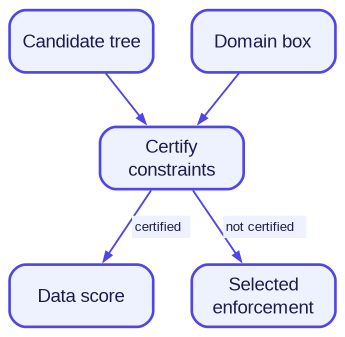
Configuration
Pass a JSON configuration with --shape-constraints-config:
{
  "domains": { "theta": [1.0, 3.0] },
  "constraints": [
    { "op": "derivative", "variable": "theta", "order": 1, "sign": -1 }
  ]
}
domains maps every referenced input to its closed interval. Each constraint selects one quantity:
{ "op": "id", ... }constrains the model output.{ "op": "derivative", "variable": "x", "order": 1, ... }constrains the first partial derivative with respect tox.order: 2constrains the corresponding unmixed second partial derivative.
Every constraint must use exactly one of:
"sign": 1: output or derivative is non-negative everywhere. For a first derivative, this means non-decreasing in that variable."sign": -1: output or derivative is non-positive everywhere. For a first derivative, this means non-increasing in that variable."bound": [lo, hi]: the selected quantity stays in the inclusive interval.
Mixed partial derivatives are not supported.
Canonical example: Feynman1
The Florian Bachinger JDIQ data-validation repository defines Feynman1 on theta ∈ [1, 3] as f(theta) = exp(-theta² / 2) / sqrt(2π).
On that domain it is decreasing. The upstream repository also specifies a non-negative second derivative:
That condition is mathematically true, but it reaches zero at theta = 1. Finite-precision interval enclosures can conservatively include a small negative value at that boundary and decline to certify the exact expression. Use the first-derivative condition as the reliable minimal example; add the curvature condition only after checking the final shape-constraints: status for the selected bound mode and domain. Its value lies in [0.0044318484, 0.2419707245]; add an id bound only when that property is part of the intended model contract.
Enforcement
With a configuration, the default is hard-reject:
- Hard reject assigns
--shape-worst-valueto every objective of an infeasible candidate. It is the strictest option and changes the search trajectory. - Penalty adds a weighted violation objective to the error objective.
- Extra objective adds shape violation as a separate NSGA-II objective.
- Feasibility first is available with GP; it prefers feasible candidates during comparison.
Use --shape-enforcement to select a comma-separated combination supported by the chosen algorithm. NSGA-II supports hard rejection, penalty, and an extra objective; its default is hard rejection.
Bound backends
--shape-bound-mode interval is the default. It uses interval arithmetic to certify the requested bounds over the domain box. The other modes are:
combined: affine arithmetic with an interval fallback;affine: affine arithmetic only;bisected: interval arithmetic over subdivided boxes, specified together withinterval.
A successful run means that the returned model was scored under the selected enforcement policy. Check the final shape-constraints: status line when a certificate is required: a model can be printed after an infeasible hard-reject search if no feasible individual was found.
Choose a compatible domain
The constraints must be true of the behavior you intend to learn on the whole declared box. They are not pointwise checks on the training rows.
For example, Pagie-1 is U-shaped in each signed input over [-5, 5]. A non-decreasing derivative constraint in X or Y over that full box is incompatible with the target and should not be used to compare constrained and unconstrained model accuracy. Restrict the domain to a region with the intended shape, transform the input, or choose a compatible problem such as Feynman1.
Reproducible Feynman1 invocation
Prepare a CSV with theta and F columns sampled from the formula above, save the JSON configuration as feynman1-shape.json, then run:
./operon_nsgp \
  --dataset feynman1.csv --train 0:2000 --target F \
  --population-size 500 --generations 150 --seed 42 --threads 1 \
  --enable-symbols exp \
  --shape-constraints-config feynman1-shape.json
For performance measurements, invoke the built executable directly after it has been built. Do not include nix develop activation in the timed region.